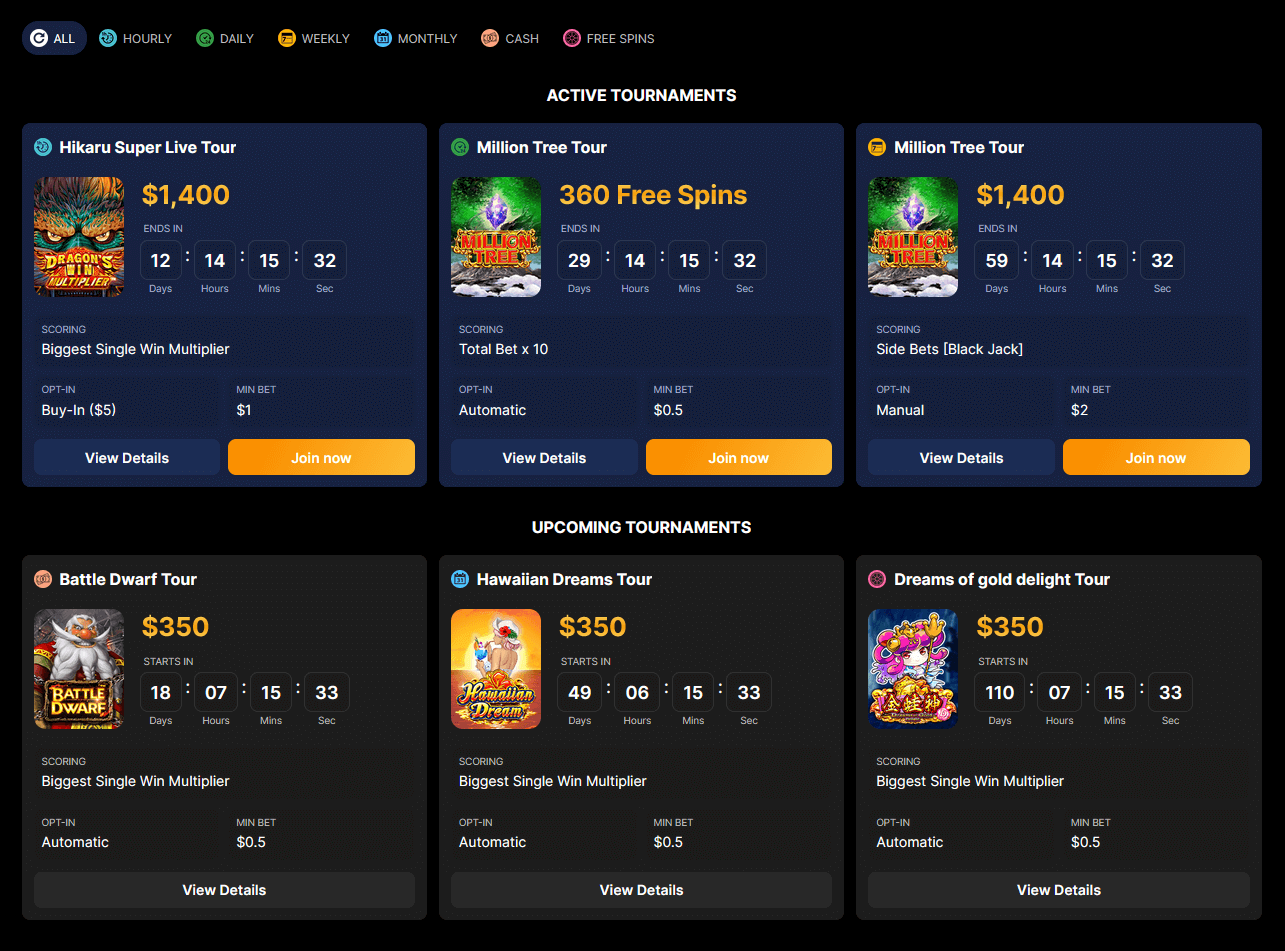
Lobby UI
Integration of this component is optional and primarily useful for casino operators. If you are a game provider or aggregator, the in-game widget serves that purpose too. If you would like to offer the lobby to your operator clients, this is possible, but they will need to explicitly integrate it into their site.
The lobby component of Gamity displays a list of currently active and upcoming tournaments. Players can view detailed information about these tournaments, including the opt-in type, minimum bet amount, prize distribution, eligible games, terms and conditions, among others. Additionally, players can directly launch games eligible for the tournaments from the lobby. This component is typically placed on a dedicated page, accessible through a specific menu item (e.g., Tournaments).
The integration of the lobby can be achieved through various methods, depending on the UI technology utilized by the host site:
Player Information and Wallet Session in the Lobby
The lobby has various functionalities, some of which require player information (playerId) or a wallet session and some that do not. For example, displaying the number of raffle tickets a player has requires player information. The lobby can operate on different levels depending on the availability of this information:
-
Render the lobby without any player information or wallet session: This approach allows the lobby to render quickly without waiting for the player’s information. For instance, the lobby can display available tournaments and raffle details without the player’s information, and then update with the player’s raffle tickets when it becomes available.
-
Render the lobby with player information, but without a game session: This mode allows the lobby to render with all the player’s information, such as the number of raffle tickets the player has. This is achieved by passing a JWT token to the lobby in the
playerJwtTokenparameter. -
Render the lobby with a game session: This mode enables the lobby to render with all the player’s information and supports making debit/credit calls against the casino’s wallet. An example is buy-in tournaments, where the player’s balance is debited when the player opts into the tournament. This is done by passing a game session ID to the lobby in the
gamitySessionRefparameter. (Note: THIS FUNCTIONALITY IS NOT YET IMPLEMENTED IN THE LOBBY.)
Since the creation of the JWT token or the game session involves calling the server and may take time, it is best practice to render the Lobby without this information initially. This allows the player-independent parts, such as available tournaments, to start rendering immediately. Once the player information is available, the Lobby component can be updated with the new parameters. This approach provides the fastest render time and the best user experience.
Launching games
The lobby system does not have direct knowledge of the mechanisms the hosting site uses to launch games. Therefore, it uses a callback function, which can be passed as a parameter to the lobby. This function informs the hosting site which game to launch. The signature of the callback function is as follows:
    onGameLaunch(gameCode) {
      ...
    }